Best Docking Station for Asus Laptop
Looking to elevate your ASUS laptop experience? Discover the ultimate docking stations that seamlessly blend power and convenience, transforming your workspace into a hub of productivity and style. Unveil the perfect match for your device and enjoy effortless connectivity with these top picks.
Most Wallet-Friendly: HODO Docking Station

| Highlights |
|---|
| Supports dual monitors |
| 4K and 8K display support |
| Power delivery up to 100W |
The HODO Docking Station is a stellar choice for those seeking versatile connectivity without breaking the bank.
With support for dual 4K monitors, it truly enhances your multitasking game, especially if you're into crisp visuals and smooth performance.
The 100W Power Delivery ensures your ASUS laptop stays charged while connected, making it perfect for all-day productivity.
While it does require external power and has some limitations with MacOS, its broad compatibility and rich ports—like HDMI, DisplayPort, VGA, and USB hubs—make it a fantastic, budget-friendly option for most Windows users.
Be sure to also check out the best cooling station for ps5 for more options!
Best for Multi-Monitor Setup: Selore S Global Dock

| Highlights |
|---|
| Easy plug-and-play setup |
| Supports dual 4K HDMI |
| Strong power delivery |
The Selore 8-in-1 dual HDMI hub truly elevates your laptop setup, especially if you're juggling multiple screens.
Supporting dual 4K HDMI output, it ensures your workspace feels expanded and vibrant.
Plus, with 100W PD charging, your laptop stays powered up during those marathon work sessions, all while keeping things simple with plug-and-play ease.
The variety of ports — USB-C, USB-A, SD/TF cards — make it an all-in-one solution for home or office use.
However, keep in mind that extended mode isn’t supported on MacOS, and you'll need your own power adapter.
Overall, it’s a versatile, powerhouse for multi-monitor enthusiasts.
Be sure to also check out the best playstation portal accessories for more options!
Best for High-Speed Data Transfer: USB C Docking Station

| Highlights |
|---|
| Easy to connect |
| Compact design |
| Fast data transfer |
simplicity and speed are at its core.
The dock connects seamlessly, making setup a breeze, and its compact design is perfect for squeezing into tight spaces.
The standout feature? Lightning-fast 10Gbps data transfer that powers through large files without breaking a sweat.
It also supports stunning 4K visuals via HDMI and DisplayPort, ideal for professional workflows.
However, it does have its limits—like a few compatibility quirks and a somewhat high price point.
Still, if you need quick data speeds and reliable visuals, this is a game-changer.
Be sure to also check out the best skins for laptops for more options!
Best for Rapid Charging: Plugable UD-3900H

| Highlights |
|---|
| Supports dual monitors |
| Easy setup |
| Universal compatibility |
The Plugable UD-3900H excels in rapid charging thanks to its 100W Power Delivery, meaning you can juice up your ASUS laptop quickly while multitasking across dual 4K HDMI displays.
Its flexible expandability means seamless connection via USB-C or USB 3.0, supporting everything from Ethernet to multiple USB devices.
While it doesn't power your laptop directly, its dedicated power adapter ensures your device stays charged without draining your battery.
Perfect for productivity and smooth workflow, this dock is a versatile choice for users who need fast charging and reliable dual-monitor support without fuss.
Be sure to also check out the best cooling stand for ps5 for more options!
Amazon Basics Thunderbolt 4 Dock

| Highlights |
|---|
| Supports dual 4K displays |
| Travel-friendly design |
| Dynamic 96W charging |
The Amazon Basics Docking Station delivers reliable dual 4K@60Hz support, perfect for multitasking or streaming high-res content effortlessly.
Its travel-friendly size makes it a great companion for those constantly on the go, slipping easily into your bag.
The dynamic 96W charging ensures your ASUS laptop gets most of the power it needs, although it might fall short for high-wattage models.
Keep in mind, bandwidth sharing across ports can cause some slowdown if you’re pushing multiple devices simultaneously.
Overall, a solid, versatile option for ASUS laptop users who value convenience and performance.
Be sure to also check out the best cooling fan for ps5 horizontal for more options!
LIONWEI Docking Station

| Highlights |
|---|
| Multi-monitor support |
| Fast 100W charging |
| Wide device compatibility |
The LIONWEI USB C Docking Station truly lives up to its promise of transforming your ASUS laptop into a multi-monitor powerhouse.
With support for dual HDMI and DisplayPort, you can effortlessly extend your workspace across three screens, boosting productivity and making multitasking a breeze.
The 100W fast charging ensures your laptop stays powered up even during intense work sessions.
Plus, with gigabit Ethernet and quick data transfer ports, connectivity is virtually seamless.
While Mac users should note some display limitations, Windows users will enjoy a stable, versatile dock that effortlessly simplifies their setup.
Be sure to also check out the best hacking wifi adapter for more options!
LIONWEI USB C Hub Docking Station for Asus Laptop

| Highlights |
|---|
| Multiple USB ports |
| Supports dual/quad monitors |
| Fast data transfer |
The 13-in-1 versatility truly stands out—covering nearly all your connectivity needs.
Whether you're plugging in multiple monitors with 4K support or transferring data at lightning-fast speeds, this dock handles it with ease.
The dual USB C ports supporting 100W Power Delivery keep your ASUS laptop charged while you work.
Plus, the Gigabit Ethernet ensures smooth online experiences, perfect for gaming or video calls.
While Mac users might face some limitations, Windows setups will definitely appreciate the flexibility and performance packed into this sleek, yet slightly bulky, hub.
Be sure to also check out the best printers for dell laptops for more options!
ASUS Dual 4K USB-C Dock
| Highlights |
|---|
| Supports dual 4K monitors |
| Fast 10 Gbps data transfer |
| 100W charging power |
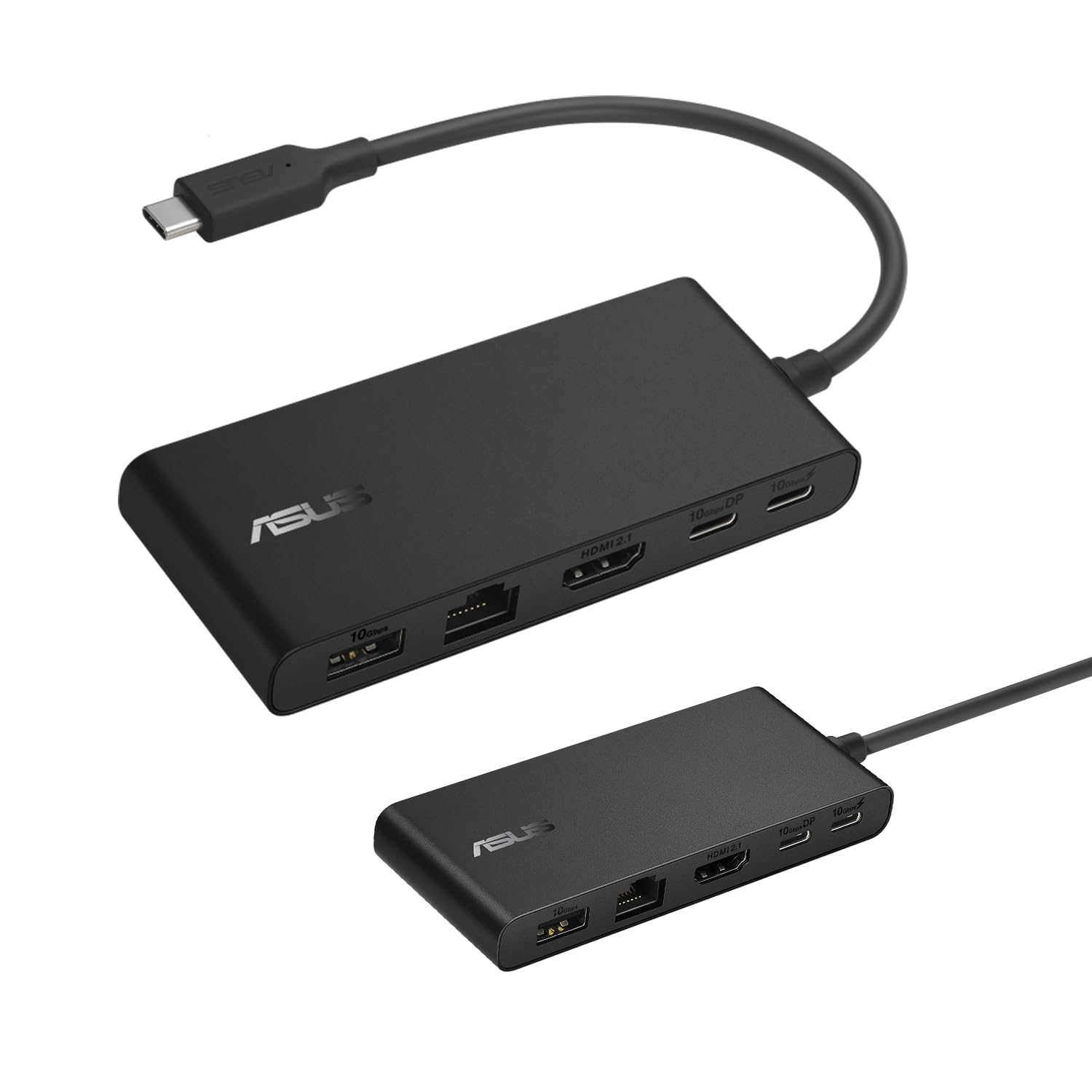
The ASUS Dual 4K USB-C Dock offers versatile expansion with its compact yet powerful design, supporting dual 4K monitors at an impressive 144Hz, or even 8K at 30Hz.
Data transfers are lightning-fast, reaching 10 Gbps on both USB-A and USB-C ports—making file transfers quick and effortless.
Plus, its 100W Power Delivery means you can charge your laptop while working.
While it’s a bit bulky for small desks and works best with compatible ASUS laptops, its durability and performance make it a solid choice for those seeking high-quality connectivity in their workspace.
Be sure to also check out the best cooling for gaming laptop for more options!
LIONWEI Docking Station

| Highlights |
|---|
| Multiple 4K Display Support |
| Wide Range of Ports |
| Fast Data Transfer |
The 13-in-1 versatility means you can easily connect multiple monitors, with up to three supported at once, thanks to dual 4K HDMI and DisplayPort outputs—perfect for multitasking.
The fast data transfer speeds via USB 3.1 and SD/TF card readers make file transfers a breeze.
Plus, with 100W Power Delivery, your ASUS laptop stays charged while you're plugged in.
The Ethernet port offers a stable, speedy connection for gaming or streaming.
While it’s a tad bulky and MacOS extension is limited, its wide array of ports and reliable performance make it a solid choice for power users.
Be sure to also check out the best cooling system for ps5 for more options!
VVB Docking Station Docking Station for Asus Laptop

| Highlights |
|---|
| Compact and lightweight |
| Affordable multiport solution |
| Easy to set up |
The VVB Docking Station 9 in 1 packs a punch in a tiny package, offering versatile connectivity for your ASUS laptop.
Its dual HDMI outputs and VGA port make multitasking a breeze, whether you’re working or streaming.
The 100W PD charging ensures your laptop stays powered — just remember, a higher wattage adapter enhances charging speed.
While the resolution is limited for dual monitors, it still handles your daily tasks and presentations with ease.
Plus, the sleek design and straightforward setup make it a smart, budget-friendly addition to any workspace.
Be sure to also check out the best cooling fan for ps4 for more options!
LIONWEI
| Highlights |
|---|
| Multiple 4K HDMI ports |
| High-speed data transfer |
| Supports triple monitors |
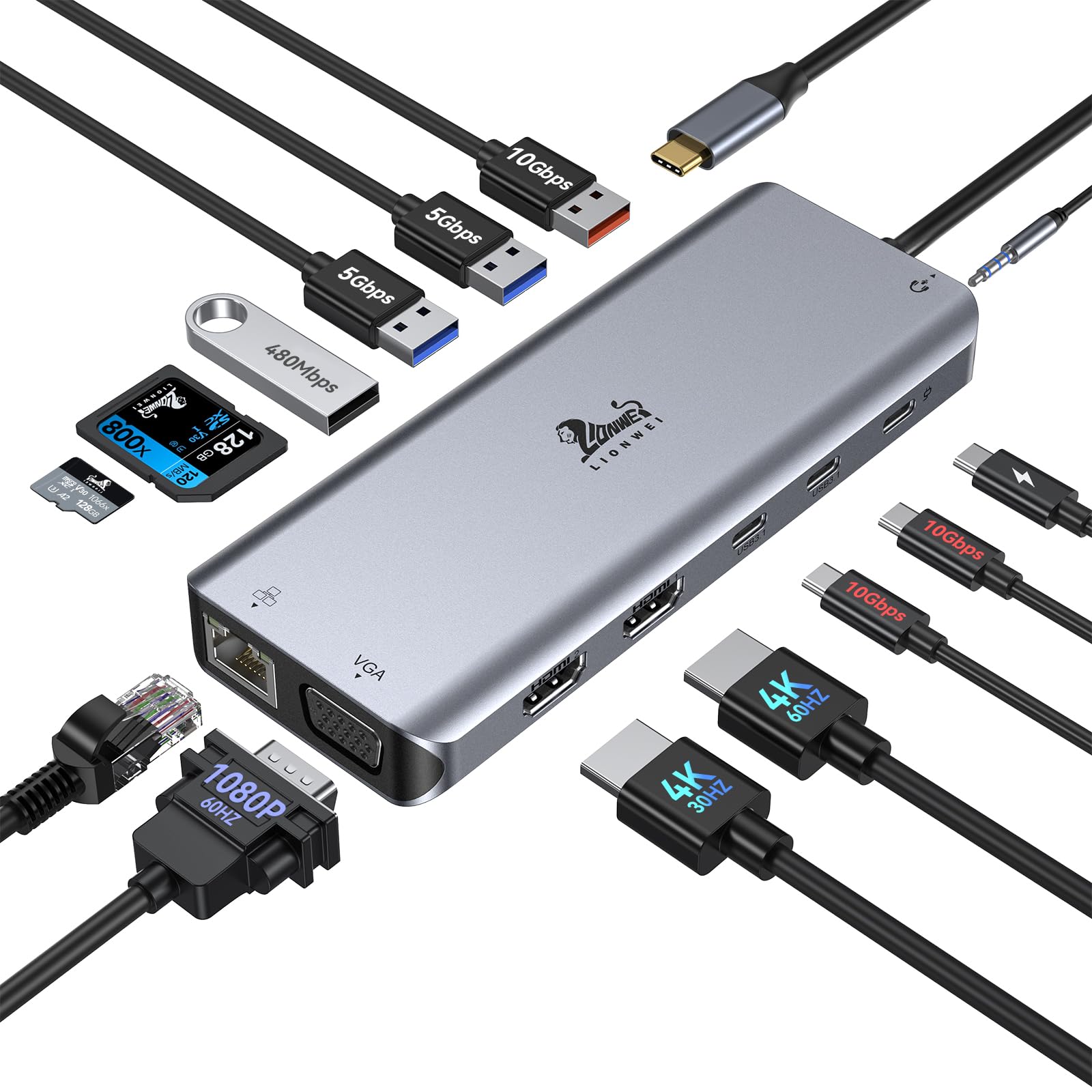
The LIONWEI 14-in-1 USB C Dock offers incredible versatility, boasting dual 4K HDMI ports and a VGA for multiple display setups — perfect for multitasking.
Its super-fast 10Gbps data ports cut down on transfer wait times and boost your productivity.
The support for triple monitors under Windows really shines, giving you expansive workspace, though Mac users should note it mirrors displays due to system limitations.
Charging up to 87W keeps your laptop powered, but keep in mind you'll need to supply your own charger.
With an 18-month warranty, this dock combines performance with peace of mind.
Be sure to also check out the best dock for surface laptop 4 for more options!
Kensington Docking Station

| Highlights |
|---|
| Supports Triple 4K Displays |
| Power Delivery 100W |
| Multiple Connectivity Options |
The Kensington triple display docking station delivers remarkable flexibility with its four video-out ports, supporting up to three 4K monitors — perfect for multitasking mavens.
Its 100W Power Delivery ensures your ASUS laptop stays topped off while powering peripherals effortlessly.
The inclusion of SD/microSD card readers and USB 3.2 ports keeps your workflow smooth and organized.
Plus, the DockWorks WiFi Auto-Switch offers stable internet connectivity.
While device compatibility can be hit or miss and Ethernet speeds fluctuate, overall, this dock provides a robust, versatile hub for enhancing your ASUS laptop experience.
Be sure to also check out the best stickers for laptops for more options!
Baseus Docking Station Docking Station for Asus Laptop

| Highlights |
|---|
| Multiple Ports for Flexibility |
| High-Quality Video Output |
| Stable Ethernet Connection |
The multiple ports make it versatile enough to handle all your peripherals—USB-C, USB 3.0/2.0, SD, and TF cards—meaning you can transfer files at lightning-fast speeds and connect your favorite devices with ease.
The ultra HD video output at 4K@120Hz delivers crisp visuals, perfect for gaming or content creation.
Plus, the stable 1000Mbps Ethernet ensures your internet connection remains solid, even if your Wi-Fi is shaky.
Compact and lightweight, it’s a sleek companion for boosting productivity, though it’s worth noting it doesn’t support M-Series MacBooks and offers up to 85W power delivery.
Be sure to also check out the best safe for laptops for more options!
Plugable UD-3900PDZ

| Highlights |
|---|
| Supports 3 HDMI Monitors |
| Powerful Connectivity Options |
| Plug and Play Setup |
The 12-in-1 expansion capabilities are truly versatile, supporting up to three HDMI monitors, including a stunning 4K option.
The plug-and-play setup makes it super user-friendly—just connect and go.
Thanks to USB-C Power Delivery, your ASUS laptop stays charged while you multitask.
While HDCP isn't supported, this docking station excels at boosting productivity with seamless connectivity across Windows, macOS, and ChromeOS systems.
However, it’s worth noting that Linux compatibility is limited, and some ports may experience minor hiccups.
Overall, a reliable and powerful hub for any busy workspace!
Be sure to also check out the best car charger for laptop for more options!
Baseus Spacemate

| Highlights |
|---|
| Supports Triple 4K Displays |
| Fast 10Gbps Data Transfer |
| Sleek Vertical Design |
The Baseus Spacemate Docking Station truly packs a punch with its high-spec 11-in-1 expansion.
It seamlessly connects up to three 4K monitors—perfect for multitasking, whether you're editing, gaming, or just juggling multiple spreadsheets.
The fast 10Gbps data transfer ensures your files move quickly, saving you precious time.
Its sleek vertical design not only looks modern but keeps your workspace tidy.
The screen-lock button adds a layer of security when needed, and the 100W PD charging keeps your laptop powered up all day.
Just note, the short USB-C cable might be a downside, and you'll need to supply your own power adapter.
Be sure to also check out the best cooling pad for macbook pro for more options!
Plugable UD-3900Z Docking Station for Asus Laptop

| Highlights |
|---|
| Easy dual HDMI setup |
| Plug and play |
| Universal compatibility |
The Plugable UD-3900Z offers exceptional flexibility with dual HDMI outputs, making it perfect for anyone looking to set up a dual monitor workspace effortlessly—even if your Asus laptop only has a single video port.
Its plug-and-play design ensures quick setup, and its universal compatibility means it works seamlessly with Windows, macOS, and ChromeOS systems.
Although it doesn't charge your host machine, it compensates with multiple USB ports and reliable Ethernet.
Ideal for productivity at home or in the office, this dock simplifies your workspace without any fuss.
Be sure to also check out the best cooling fan for xbox series x for more options!